If your team uses NetSuite, the first question is rarely whether an integration exists. The real question is how that integration fits the workflow you already run. TechGrid supports NetSuite across two core workflow models, Quote to Order and Quote to Cash.
The role NetSuite plays changes based on which model your business needs.
-
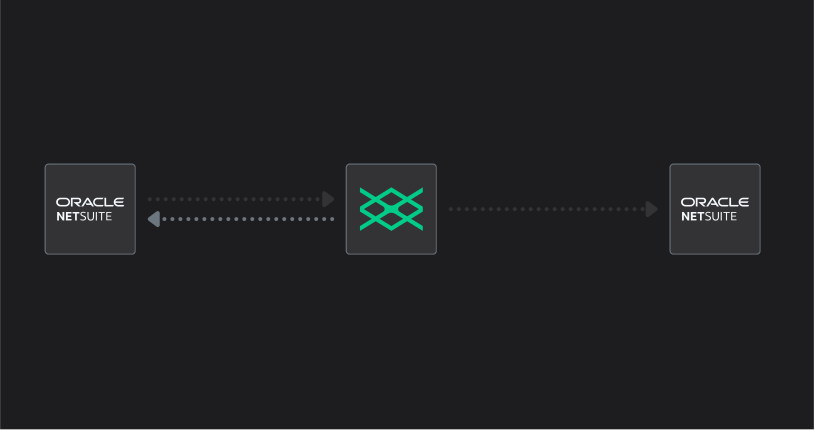
NetSuite (CRM) ➡️ TechGrid (CPQ) ➡️ NetSuite (PSA/ERP/Accounting)
- NetSuite (CRM) ➡️ TechGrid (CPQ) ➡️ TechGrid (Fulfillment) ➡️ NetSuite (Accounting)
This post breaks down how TechGrid connects to NetSuite across both workflow models, what data moves and when, and what you need to know before you set it up.
TechGrid products and workflow models
To understand the NetSuite integration, you first need to understand how TechGrid is structured.
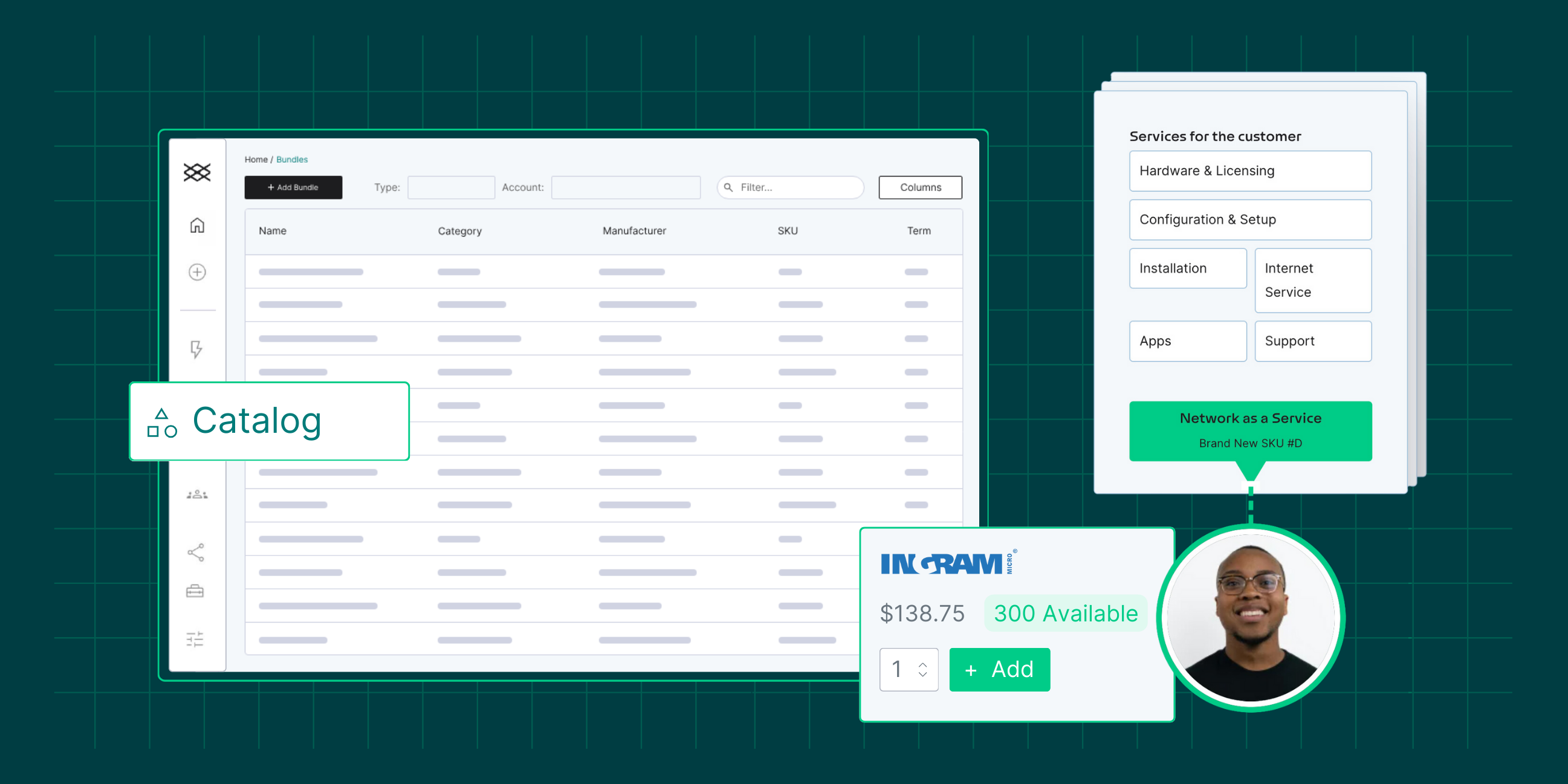
TechGrid CPQ is the foundation for the sales side of the workflow. It supports:
- Catalog Management
-
Configure, Price, Quote
- Quote acceptance
-
The structured handoff from quote to purchase order
TechGrid Fulfillment is an optional add-on that extends the workflow beyond CPQ. Instead of handing off to an external system at the point of acceptance, the process continues inside TechGrid.
That creates two workflow models:
-
Quote to Order = TechGrid CPQ
-
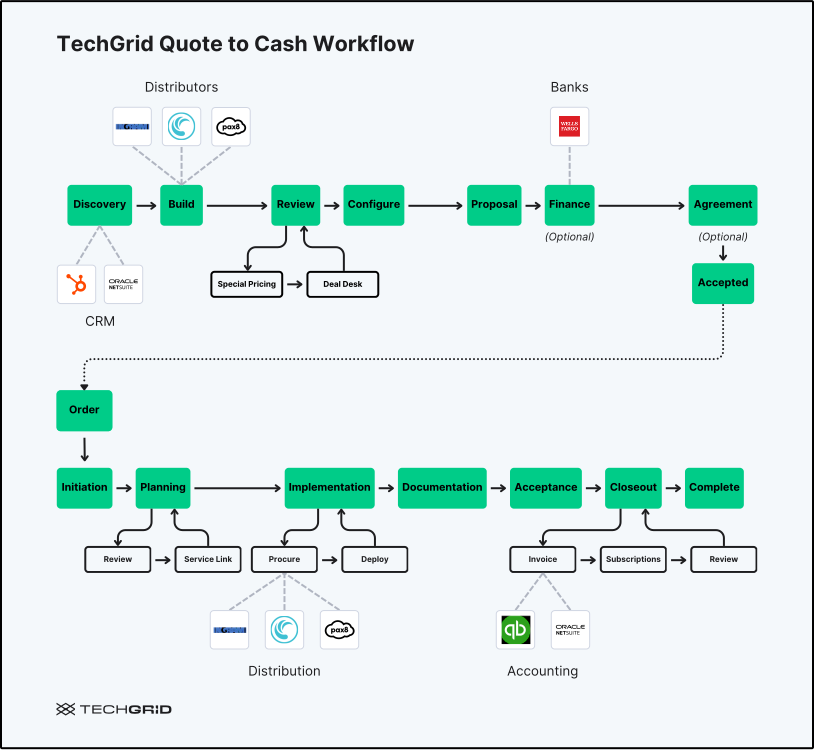
Quote to Cash = TechGrid CPQ + TechGrid Fulfillment
 Why this matters for MSPs and VARs
MSPs and VARs rarely operate in a straight line from quote to revenue. Sales, operations, finance, and leadership all need accurate data at different points in the process. When those handoffs depend on manual work, teams lose time and visibility.
A well-configured NetSuite integration reduces that friction by keeping each system in the right role at the right stage. Common friction points it helps solve:
-
Duplicate data entry between systems
-
Quote and order rework due to missed information
-
Delayed handoffs between sales and operations
-
Finance cleanup after orders are placed
-
Weak reporting visibility into deal margins and revenue
The business outcomes:
-
Faster quote creation with existing account data in place
-
Cleaner data across sales, operations, and finance
-
Better operational continuity from quote through fulfillment
- Higher profitability from more efficient processes
-
Stronger forecasting because the right numbers are syncing at the right time
The good news is that both TechGrid workflow models start in a familiar place.
The shared front-end NetSuite connection
In both Quote to Order and Quote to Cash, NetSuite can serve as the CRM at the start of the process. TechGrid pulls in the account and opportunity context so sales reps start from an existing record instead of building from scratch.
Front-end data that can flow in from NetSuite includes:
-
Company records
-
Contact records
-
Deal records
-
Deal Pipelines and Stages
The practical benefit is straightforward. Reps do not rebuild records or manually carry information into the quote workflow. The same customer and deal context that exists in NetSuite moves into TechGrid at the point where quoting begins.
From there, the workflow splits based on whether the business is running Quote to Order or Quote to Cash.
Quote to Order with TechGrid CPQ
In a Quote to Order model, TechGrid CPQ manages the configure, price, quote (CPQ) workflow. Once the quote is accepted, the downstream process moves out of TechGrid and into the next operational system.
This is the right model for teams that want structured quoting and sales automation while continuing procurement, delivery, and invoicing elsewhere.
.svg)
NetSuite as CRM at the start
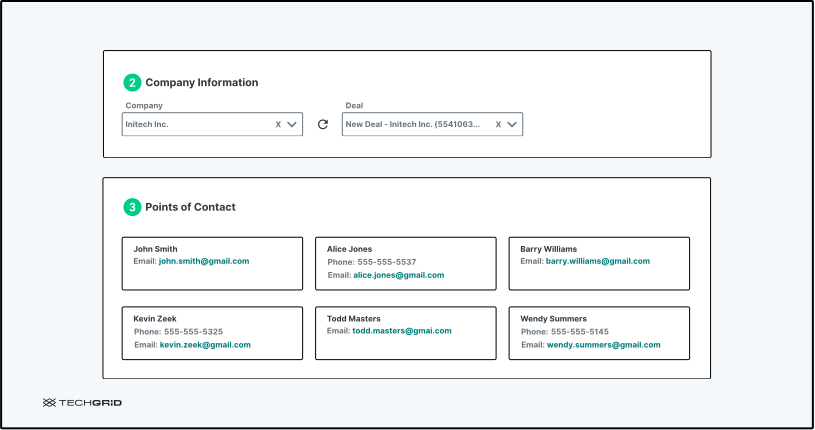
At the beginning of the Quote to Order workflow, NetSuite acts as the CRM. Company and deal data flows into TechGrid CPQ so the quote starts from an existing record.
The data that will sync at the beginning of a quote includes:
- Company name
- Deal name
- Contact names associated with the company
- Contact email
- Phone (if available)
NetSuite as CRM during quoting
As the quote progresses through TechGrid CPQ, key updates flow back into NetSuite. This keeps the CRM record current even though the quoting work is happening in TechGrid.
The sync is action-triggered, not continuous. Each time the rep moves from one phase to the next by clicking the "continue" button to advance the workflow, TechGrid sends an update to NetSuite.
For example:
-
So if a rep is in Special Pricing, adjusts the cost and clicks Next to move to Deal Desk, that is when the updated deal data syncs back.
-
If they are in Deal Desk, change pricing again, and click Next to move to Configuration, another sync fires at that point.
-
If a customer requests changes and the rep has to backtrack, the next time they advance the workflow forward again, TechGrid sends the latest version of the data. NetSuite always receives the most current state.
Data that can sync back during quoting includes:
- Quote value and revenue details
- Line item updates
- Deal status and stage changes
- Approval or acceptance milestones
- Recurring revenue figures such as monthly recurring revenue and gross profit (once the deal reaches the Special Pricing and Deal Desk stages)
This keeps pipeline and revenue visibility intact in NetSuite even as the active work happens inside TechGrid.
Standard fields and custom fields
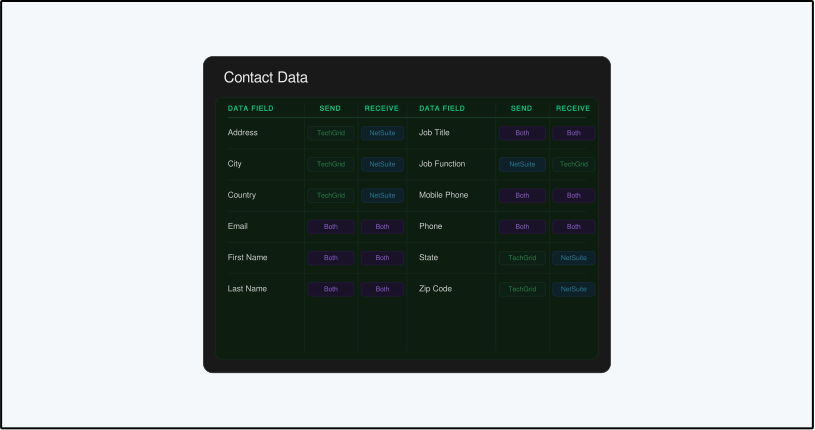
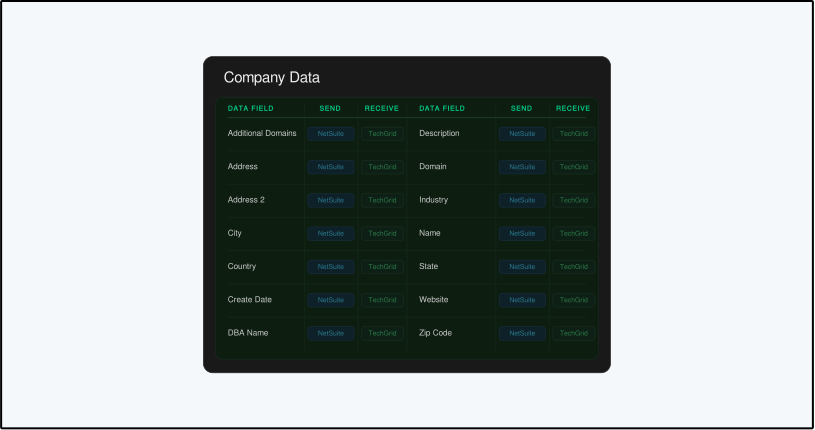
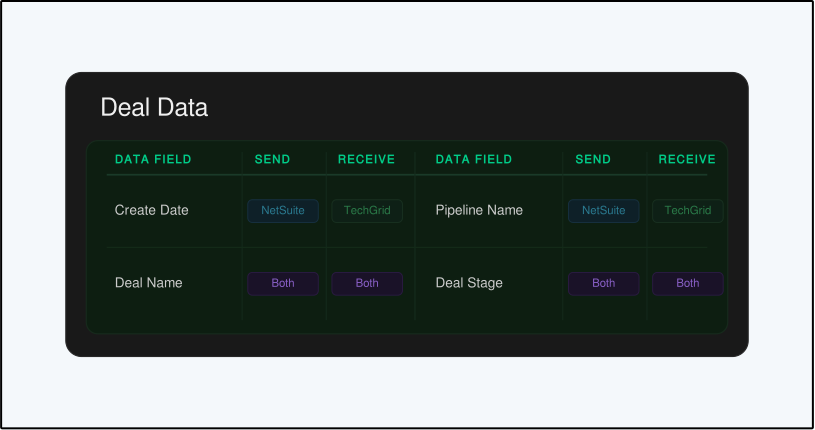
When you connect TechGrid to NetSuite as a CRM, there is a standard set of fields available for mapping right out of the box. These are the default fields most organizations start with — enough to cover the core CPQ workflow without requiring custom configuration from day one.
Contact Data:
Company Data:
Deal Data:
Deal Pipelines and Stages:
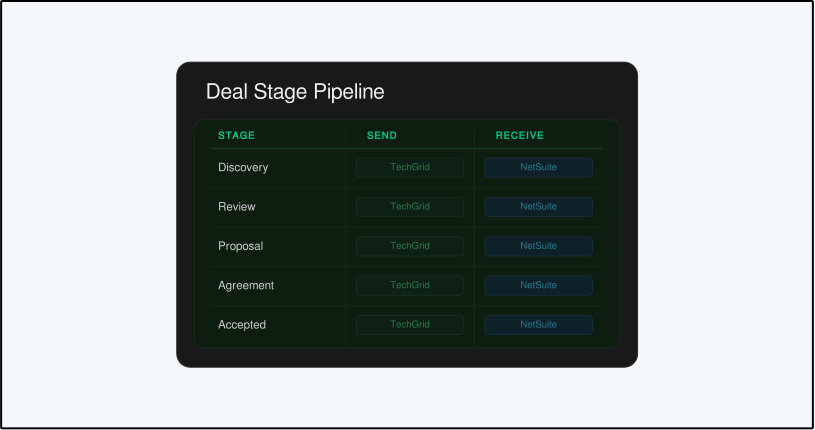
From there, you can map additional fields based on what NetSuite is configured to receive. If NetSuite has custom fields, TechGrid can map to them as long as the field types match.
For example:
-
A number field in TechGrid maps to a number field in NetSuite
-
A text field maps to a text field
The field types on both sides need to align for the mapping to work correctly.
NetSuite as ERP after quote acceptance
Once the quote is accepted — specifically, when the rep clicks Accept and Win Deal — NetSuite takes over as the downstream ERP. The process moves from sales and into fulfillment meaning functions like order management, procurement, and invoicing continue outside TechGrid from that point forward.
What gets sent at acceptance is the relevant bill of materials data. That typically includes:
- Item names
- Manufacturer part numbers (or internal part numbers, depending on your configuration)
- Costs and pricing
- Quantities
- Customer and deal details needed to create the sales order in NetSuite
NetSuite uses that data to create the sales order and begin procurement. TechGrid does not manage what happens after that point in a Quote to Order model — the process is NetSuite's from here.
One useful feature at this stage: if a line item in the TechGrid quote uses a part number that does not exist in the NetSuite catalog, TechGrid can prompt the user to create that item in NetSuite at the point of acceptance.
NetSuite uses the part number and manufacturer to check for duplicates, so existing items are matched rather than duplicated.
Quote to Cash with TechGrid CPQ and TechGrid Fulfillment
Quote to Cash combines TechGrid CPQ and TechGrid Fulfillment into a single connected workflow, from quoting through to invoice.
NetSuite as CRM at the start
Just like Quote to Order, the Quote to Cash workflow begins with NetSuite acting as the CRM, giving your team the context they need to build an accurate quote.
TechGrid Fulfillment manages the downstream workflow
After the quote is accepted, the process continues inside TechGrid Fulfillment rather than moving to NetSuite. This is what separates Quote to Cash from Quote to Order and it pushes the handoff to a later point in the lifecycle.
NetSuite as accounting and reporting at the end
Once fulfillment is complete, NetSuite receives the financial results that includes the following types of data:
- Fulfilled revenue data
- Billing-related records
- Customer financial data
- Accounting inputs for receivables and payables
- Reporting and forecasting inputs
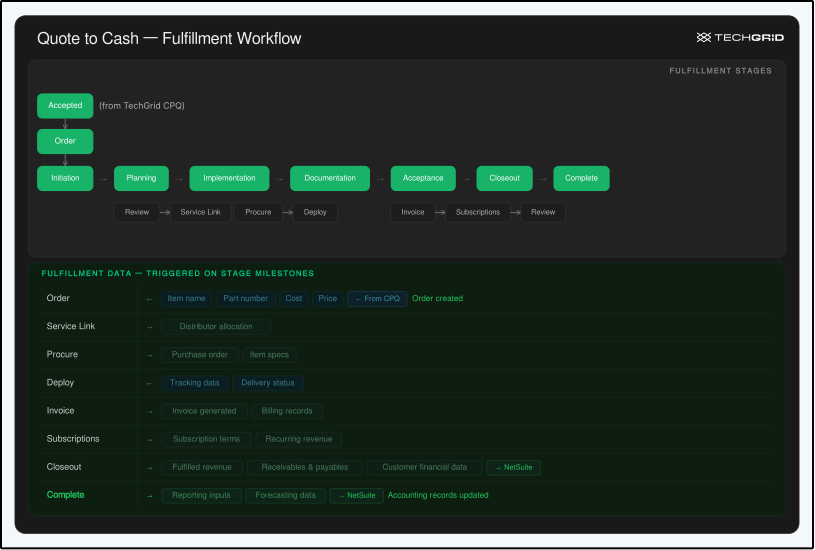
Data flows into NetSuite each time a fulfillment milestone is reached inside TechGrid. When an item is received, an invoice is generated, or a payment is recorded, NetSuite updates automatically without anyone having to re-enter data that TechGrid already holds.
Quote to Order and Quote to Cash compared
Both workflows use NetSuite at the front end and keep data connected throughout the deal. The difference is what happens after acceptance and how far TechGrid takes the work.
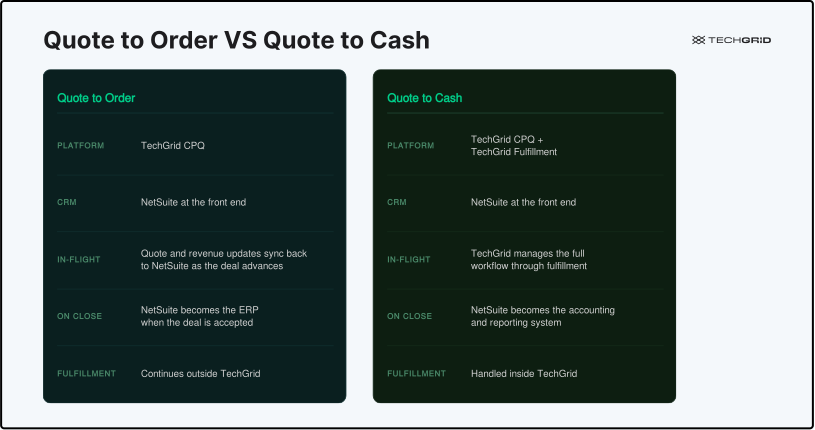
Quote to Order
- Built on TechGrid CPQ
- NetSuite is the CRM at the front end
- NetSuite receives quote and revenue updates as the deal advances through stages
- NetSuite becomes the ERP when the deal is accepted
- Fulfillment continues outside TechGrid
Quote to Cash
- Built on TechGrid CPQ + TechGrid Fulfillment
- NetSuite is the CRM at the front end
- TechGrid manages the workflow through fulfillment
- NetSuite becomes the accounting and reporting system at the end
This gives MSPs and VARs two different ways to keep NetSuite connected without forcing the same process on every team.
What data is shared between TechGrid and NetSuite
The integration doesn't sync everything at once. Different data moves at different points in the workflow, triggered by specific actions rather than running on a background schedule.
Here is a breakdown by stage:
Front-end CRM data (both models)
- Accounts
- Contacts
- Opportunities
- Ownership fields
- Customer attributes used for quoting
Quote-stage data
- Quote values and line items
- Pricing and discounts
- Revenue details including monthly recurring revenue and gross profit
- Deal status and stage changes
- Acceptance milestones
Quote to Order downstream data (at acceptance)
- Accepted quote details
- Bill of materials records
- Part numbers (manufacturer or internal)
- Costs and pricing
- Sales order data for NetSuite ERP
Quote to Cash downstream data (at fulfillment completion)
- Fulfilled revenue data
- Billing and invoice records
- Accounting inputs
- Reporting and forecasting inputs
The most common deployment patterns
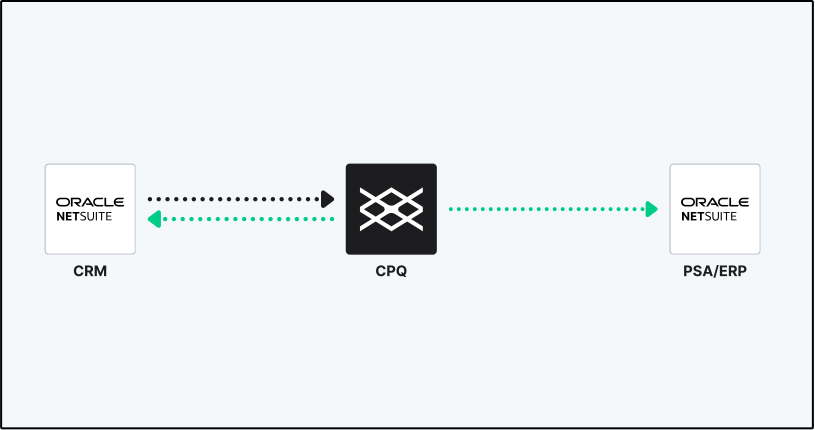
Use Case 1: Full NetSuite Stack
Based on current implementations, the most common deployment use case is a full NetSuite stack using TechGrid for CPQ.
The company has standardized on NetSuite as both their CRM and ERP, and they use TechGrid to run the CPQ and sales workflow before sending the accepted deal back into NetSuite for fulfillment and accounting.
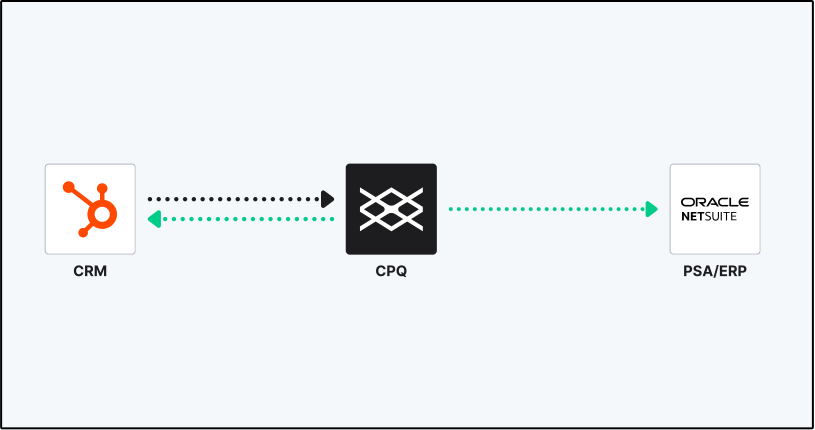
Use Case 2: HubSpot (or other CRM) upfront, NetSuite for Fulfillment
The second pattern shows up at MSPs that use HubSpot as their CRM and NetSuite as an ERP for fulfillment. TechGrid connects the two, pulling customer context from HubSpot to start the quote and handing the accepted deal off to NetSuite once it closes.
Use Case 3: NetSuite (or other CRM) upfront, TechGrid CPQ + Fulfillment
Here, NetSuite functions purely as the financial system of record, receiving data only after fulfillment milestones are completed inside TechGrid.
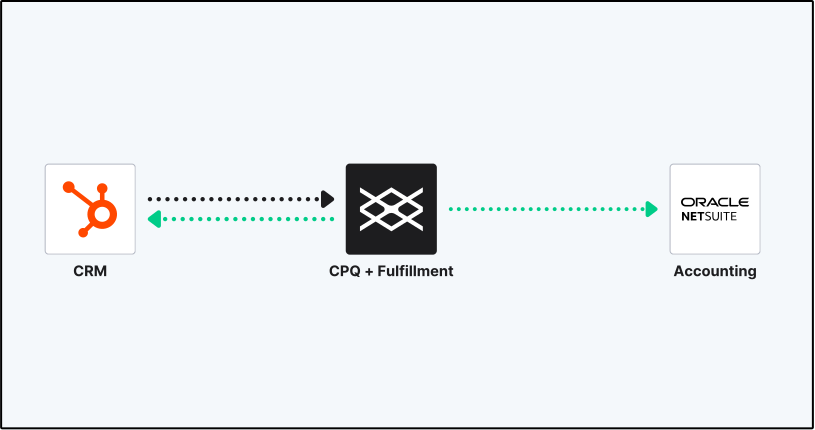
Every workflow can be adjusted based on how each system is configured. What gets sent, where it goes, and when it syncs all depends on how the integration is set up. During fulfillment, for example, TechGrid can sync task data back to NetSuite alongside the financial records."
Why native and in-house maintenance matters
TechGrid built the NetSuite integration natively and maintains it in-house, which means the team responsible for the product is also responsible for the integration. There is no third-party middleware to diagnose when something breaks and no separate vendor to contact when a sync issue comes up.
Practical benefits of that ownership model:
- Direct accountability when integration issues arise
- Roadmap alignment between the core product and the integration
- Fewer gaps between how the product works and how the integration behaves
- Better support continuity through implementation and beyond
What to evaluate when comparing platforms
When MSPs and VARs compare CPQ software and other sales automation platforms, the key question is not simply whether NetSuite is supported. The better question is whether the platform supports the workflow your business actually wants to run.
Evaluate these points specifically:
- Does the platform support both Quote to Order and Quote to Cash?
- Can NetSuite play different roles at different stages — CRM at the front, ERP or accounting at the back?
- Can CRM data flow in cleanly at the start of the quote, and sync back as the deal advances?
- Can accepted quote data and bill of materials records move into NetSuite without re-entry?
- Can fulfillment data flow into NetSuite for accounting and reporting once the work is done?
- Is fulfillment handled inside the platform or does it push out to another system at acceptance?
- Is the integration native and maintained by the platform vendor?
A solution that answers most of those with yes will hold up as your workflow evolves. Watch out for answers like 'we support that through a partner,' because that complexity has a way of showing up at the worst time.
TechGrid CPQ and TechGrid Fulfillment are built for MSPs and VARs that run complex sales and fulfillment workflows. To get a closer look at how TechGrid connects with NetSuite, schedule a demo to see it in action.