Every MSP has had this moment. A customer needs a laptop for a new hire and has two options:
-
Wait on a quote from you
-
Buy it from Best Buy or Amazon
More businesses are picking option two, and every time they do, that revenue goes to a retailer that was never trying to be an MSP, or to a competitor that already built the storefront you haven’t.
Most MSPs are trying to rely on their PSA but it was never built as a commerce system. It can create a sales order, but it doesn’t have an order management system, and it doesn’t integrate with procurement, the two things you actually need to sell online.
To deploy an MSP storefront, your commerce back-office needs to have a digital catalog, pricing logic that holds across customers, and an order management system that gets the order into procurement and back out with tracking attached.
Try to bolt one on without the right plumbing in place and your storefront is just another friction point that will cost you time and revenue.
Here’s a guide on how to build a successful storefront strategy that delivers the “Amazon” like experience your customers are asking for.
Your Customers Expect One Login, NOT Six
Your customer’s IT lead orders a laptop from Amazon in ninety seconds. One login, one cart, tracking number sent right to their phone or inbox. Then they turn to your business and need six different logins to get anything done: one for tickets, one for orders, one for billing, one for messaging.
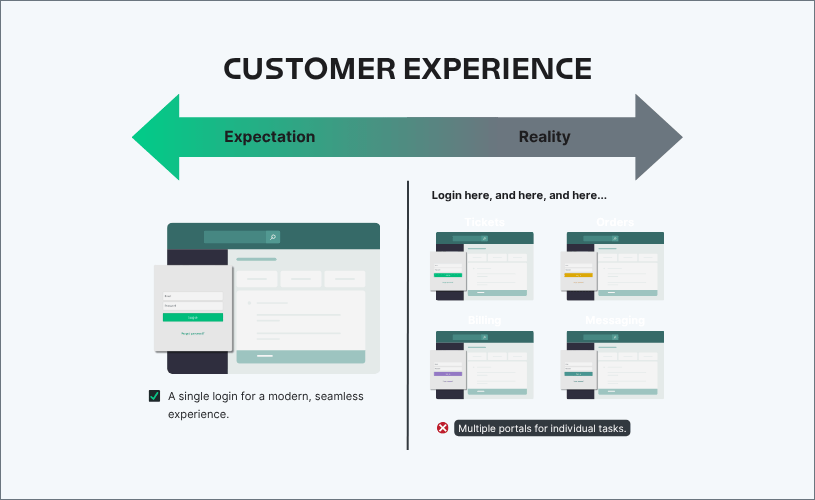
That gap is more than an inconvenience. It’s the reason self-service adoption stays low even when a storefront technically exists. If ordering a device from you takes more steps than ordering it from a retailer, customers will go around you.
And even where a storefront, or ecommerce site, does exist, it’s often the wrong one. Some MSPs solve “give the customer a catalog” by piping in a raw distributor feed and calling it done. A major reseller like CDW runs a curated catalog of a few hundred thousand items. A distributor like Ingram Micro carries well over a million. Handing a customer the full unfiltered feed isn’t helpful, it’s giving them a maze of options to get lost in.
The fix is giving each customer a buying experience that’s actually built for what they want or are approved to purchase.
Customers Buy Two Ways but Most Backends Only Support One
Businesses buy in two distinct modes, but most MSP tech stacks and workflows were only ever built for one.
The first is the typical quote or CPQ motion. A customer needs a managed firewall, a new wireless network, or a large purchase that needs approval before it goes out the door.
These purchases require planning, bills of materials creation, configuration, big deal or special pricing, and formal proposals. (If you’re actively weighing CPQ options, here’s how the major platforms compare.)
The second is run-rate purchases. A new hire needs a laptop, a department needs ten Chromebooks in a week. There’s no complicated back and forth, no negotiations, no custom terms, it’s a repeat predictable purchase that should take minutes, not a multi-day quote cycle.
These two motions have separate infrastructure needs, but the modern MSP and their customers need them to now run on the same back-office system.
Why MSPs Default to a Broken Middle Ground
Without a system built for both buying motions, MSPs land in one of two workarounds, and neither one is a real solution.
Path One: Force everything through CPQ.
Even the new hire laptop goes through a configuration and proposal process. It works, technically, but it’s massive overkill for a purchase that should take minutes. Customers feel that friction and eventually stop asking.
Path Two: Bolt on a storefront to a disconnected backend.
The customer logs into the storefront, finds the laptop they need for their new hire and clicks “buy”. But underneath, that storefront is often just a product catalog and with no real connection to a live digital catalog, pricing logic that holds across customers, and an order management system that ties into procurement and real-time tracking.
The gaps show up fast, for example, no option to pick shipping methods, nowhere to capture the specific device-enrollment details a vendor needs, and no approval tiers. Once the order’s placed, someone on the MSP’s team is re-entering tracking numbers by hand in two or three different systems, because the storefront and the backend weren’t properly connected.
Both paths are workarounds for a foundation that was never built to support true ecommerce functionality.
The Real Reason Storefronts Fail
The storefront or ecommerce store itself is the easy part to build. Standing up a clean-looking store takes a weekend with the right tools. The hard part is building all the plumbing underneath it.
Four failure points show up consistently:
Catalogs that aren’t normalized. Pulling in a raw distributor feed instead of a curated, customer-specific catalog means customers are searching through a million SKUs, when what they actually need is the 5 laptops you’re going to sell them, not everything a distributor carries.
Contract pricing that doesn’t travel. A disconnected storefront can’t tell one customer’s negotiated contract price from another’s list price. Either every customer sees the same generic pricing, which breaks any deal you’ve negotiated, or someone maintains a separate price sheet outside the system that drifts out of date the moment a contract changes.
Orders that never reach procurement. When a storefront isn’t wired into an order management system, someone still has to turn every order into a real transaction on the other side. Some MSPs patch this with clunky workarounds instead of a real integration. Either way, someone's manually pushing the order through instead of letting the system do it.
Tracking that has to be typed twice.Once an order ships, someone still has to manually enter the tracking number into the storefront, then enter it again into the backend system, because the two were never connected. Ask the customer where their order is, and the honest answer is often "let me go check the email thread".
This is why so few MSPs have deployed a working storefront, even though the demand has been there for years. What's been missing is a backend built to support it.
What a Unified Commerce Layer Requires
So, what does a backend need to support both CPQ and ecommerce? A specific set of components working together:
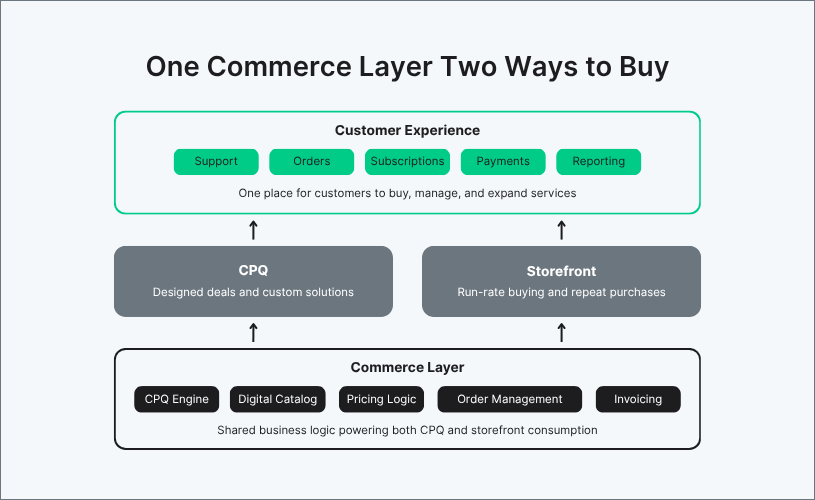
- A digital catalog: hardware, software, and services in one place, kept current through live distributor connections rather than manual updates. Each customer gets its own filtered view tied to its own negotiated pricing, since no two customer should be looking at the same 300,000-item catalog.
- A CPQ engine: quoting logic and a consistent workflow that handles bill of materials creation, configuration, pricing and costing, deal desk, proposals, and approvals.
- Bundling support: both traditional multi-line bundles and one-SKU packaged solutions.
- Pricing logic: rules that adjust across product types and customer-specific terms
- Order management, procurement, tracking and provisioning, and billing: working together as one connected chain from purchase to delivery.
Amazon Sells Products. AWS Sells Outcomes. Your Customers Want Both.
Amazon and AWS sell in two completely different motions. Amazon sells products: search, click, buy, ship. AWS sells outcomes: a configured solution built around what a specific business is trying to do.
Your customers want both. Sometimes they need a laptop, fast, no conversation required. Other times they need a complete solution: managed security, a network refresh, something built around their specific setup that nobody else is selling in that exact combination. That second kind of purchase looks a lot more like AWS than it looks like Amazon.
Most MSPs try to force customers to pick one experience. A unified commerce layer removes that choice entirely. CPQ and ecommerce stop being two competing processes and become two outputs of the same engine, drawing from the same catalog, the same pricing, and the same fulfillment workflow. Customers get the speed of Amazon when they need it and the configurability of AWS when they need that instead, without ever having to know which system is running underneath.
Start with the Backend, not the Storefront Itself
If there’s one takeaway here, it’s to fix the commerce layer first. Get the catalog, pricing, order management, and procurement connected into one system. Once that’s in place, the storefront stops being a separate build. It becomes a natural extension of the infrastructure that already exists, because turning on a storefront at that point is mostly a matter of deciding which catalog items a given customer gets to see.
This is exactly how the TechGrid commerce platform is structured: one backend, two selling motions. If you’re looking to update your quote-to-cash workflow, schedule a demo.